
Apple today began testing iOS 27.3, the biggest update to iOS 27 since its September launch. iOS 27.3 includes some features Apple introduced earlier this year and adds some completely new features.
Safari
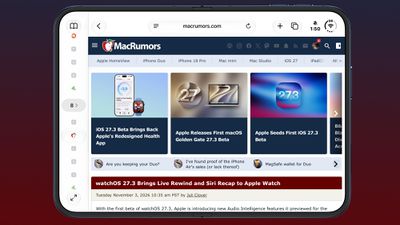
Safari offers a vertical tabbed layout option that can be enabled in Safari’s settings, as well as an adaptive dark mode for websites that don’t have a dark mode design option.
Siri AI
The Siri AI can do more within and between apps, with Apple adding a long list of new actions.

In Mail, Siri can unsubscribe you from mailing lists and cancel recently sent messages. In Weather, Siri can add locations to your weather list or control weather notifications. In Safari, Siri can clear browsing history, manage tabs and windows, save articles to a reading list, and close duplicate tabs. In Files, Siri can organize content, delete files you haven’t accessed for a set period of time, and much more.
There are new Siri actions in Calendar, Files, Journal, Mail, Maps, Messages, Music, Notes, Photos, Preview, Reminders, Safari, Shortcuts and Weather. You can find out what’s new by asking Siri what it can do in each app.
Apple is also expanding Siri AI to traditional Chinese, Vietnamese, Turkish, and Norwegian, and adding a developer preview that allows any developer to integrate their app with Siri AI.
Any app can now import its content and actions directly into the Siri AI using app intents. Siri AI can perform any custom actions implemented by developers, and skills are available to teach Siri AI to combine multiple actions into a single experience.
New Health app
The redesigned Health app is back in iOS 27.3. It has new Info and Longevity tabs that show more information about your health and fitness metrics.
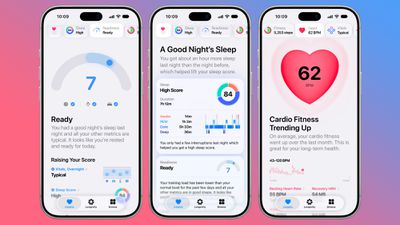
The Info tab includes your most recent health data, such as activity rings, heart rate, sleep score, and vital signs. Apple Intelligence will use this information to provide personal advice. The Health app will be able to make suggestions based on your goals and the types of activities you do.
The Longevity tab in the Health app examines health data over time. It assesses you in seven categories: heart health, sleep, mental well-being, physical health, metabolic health, hearing and nutrition. It also has a Healthy Age feature that uses information like resting heart rate, VO2 max, HRV, sleep, and biomarkers from blood tests to calculate how your health metrics compare to your actual age. Health Age draws on health data collected from the Apple Watch and incorporates fitness assessments you can take at home with tracking via the iPhone’s camera.
iPhone Duo Accessibility
Accessibility is now available on iPhone Duo. You can swipe left from the left edge or right from the right edge of the device’s outer screen to bring content closer to where your thumb is for one-handed use.
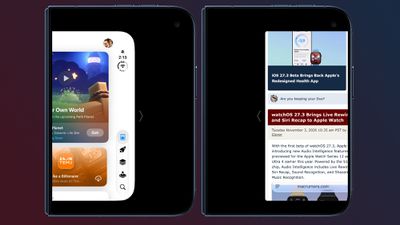
Accessibility can be enabled in the Settings app by going to Accessibility, selecting Touch, and enabling the option.
iPhone Duo Keyboard
The keyboard on the front screen of the iPhone Duo has been changed. The emoji and number keys have been swapped, as have the microphone and return keys.
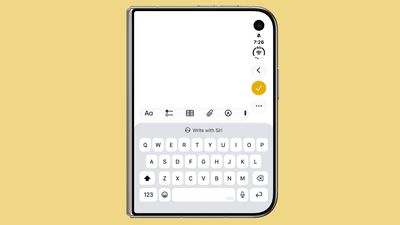
The keys are slightly taller and thinner, the space bar is wider, and the letters on each key are smaller and less bold.
To wait for
Apple is making the StandBy features introduced with the iPhone Duo available on all iPhone models that can run iOS 27. There are updated versions of the analog and digital clock faces with more customization options for color and complications, an updated Photos watch face, new Calendar and Weather faces, and the ability to create multiple versions of each face type and swipe between them.
Live Rewind and Siri Recap
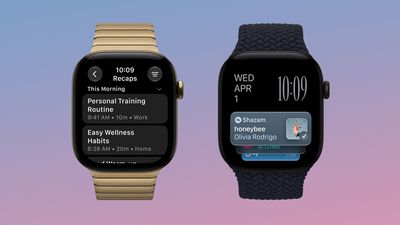
Live Rewind and Siri Recap are available in watchOS 27.3, but iOS 27.3 is also required. The features can be activated in the Watch app on the iPhone.
Apple Intelligence for China
Apple Intelligence is now available in China. It includes initial Apple Intelligence features such as live translation, writing tools, visual intelligence, email and notification summaries, Photos cleanup, and Genmoji.
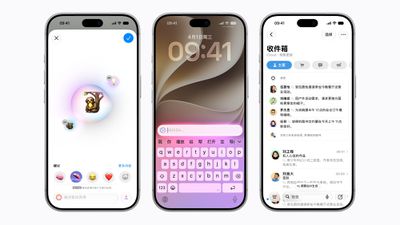
Siri AI is not available, and Apple Intelligence features are not added in iOS 27.
Earthquake warnings in China
iOS 27.3 appears to add support for security alerts. Apple worked with the China Earthquake Networks Center to add earthquake early warnings for users in China.
Selfie singing
Apple Music has a new “Selfie Sing” option that allows users to capture a video of themselves singing karaoke. The feature can be found by searching for the Apple Music Sing playlist in Apple Music, selecting a song, then tapping the camera icon to start a recording.
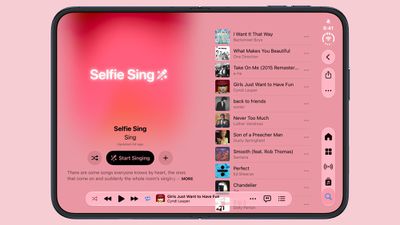
Karaoke videos can be adjusted with voice editing options and shared with friends or on social media.
Free form
In the Freeform app, there are new tools for generating custom shapes and adding images. Apple says users can create custom, editable shapes with text descriptions. This is a feature limited to Apple Creator Studio subscribers.
There are also new styles for text formatting and an option to choose a color for a table background.
Control center
The VPN toggle in Control Center now lets you quickly switch between VPNs. Previously, the toggle simply turned the last used VPN on or off.
App Library
The “Cancel” button in the App Library search interface is now an X button.
Apple Fitness+
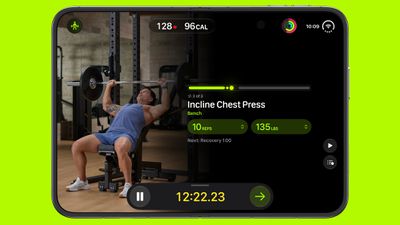
iOS 27.3 includes a new Gym Strength workout in Apple Fitness+. Gym Strength is a personalized fitness option that generates a four-week plan based on the user’s goals, experience, schedule and equipment.
Safari Settings
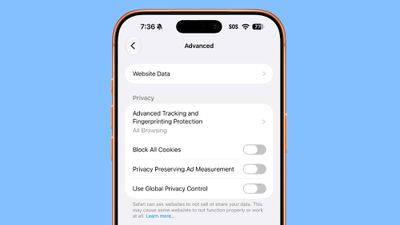
In the Advanced section of Safari settings, there is an option to “Use global privacy controls.”
Weather report
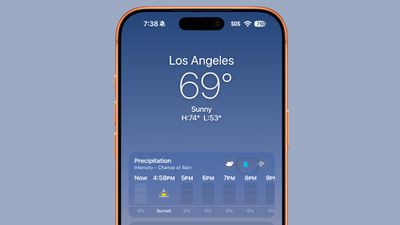
The little slider that lets you switch between Condition views in the Weather app now uses Liquid Glass. Apple also updated the appearance of precipitation in the next hour.
Australia
RCS support is available for Australian carrier Telstra in iOS 27.3.
Gn tech