

This week, Apple released the first beta version of iOS 27.3. The update includes several new features for iPhone users, including the redesigned Health app, iPhone Duo updates and more. Here’s everything you need to know about what’s new in iOS 27.3…
iOS 27.3 release date
As my colleague Ryan explained, Apple will likely release iOS 27.3 to all iPhone users sometime in December. Typically, Apple would release its x.2 software updates in December, but this year it’s different because iOS 27.1 was exclusive to the iPhone Duo. This means that in terms of timeline, iOS 27.3 is essentially the equivalent of iOS 27.2.
Here’s when Apple released its December updates in recent years:
- December 12, 2025
- December 11, 2024
- December 11, 2023
- December 13, 2022
- December 13, 2021
So with this in mind, we expect iOS 27.3 to be released sometime in the first half of December.
New iOS 27.3 features
Redesigned Health app
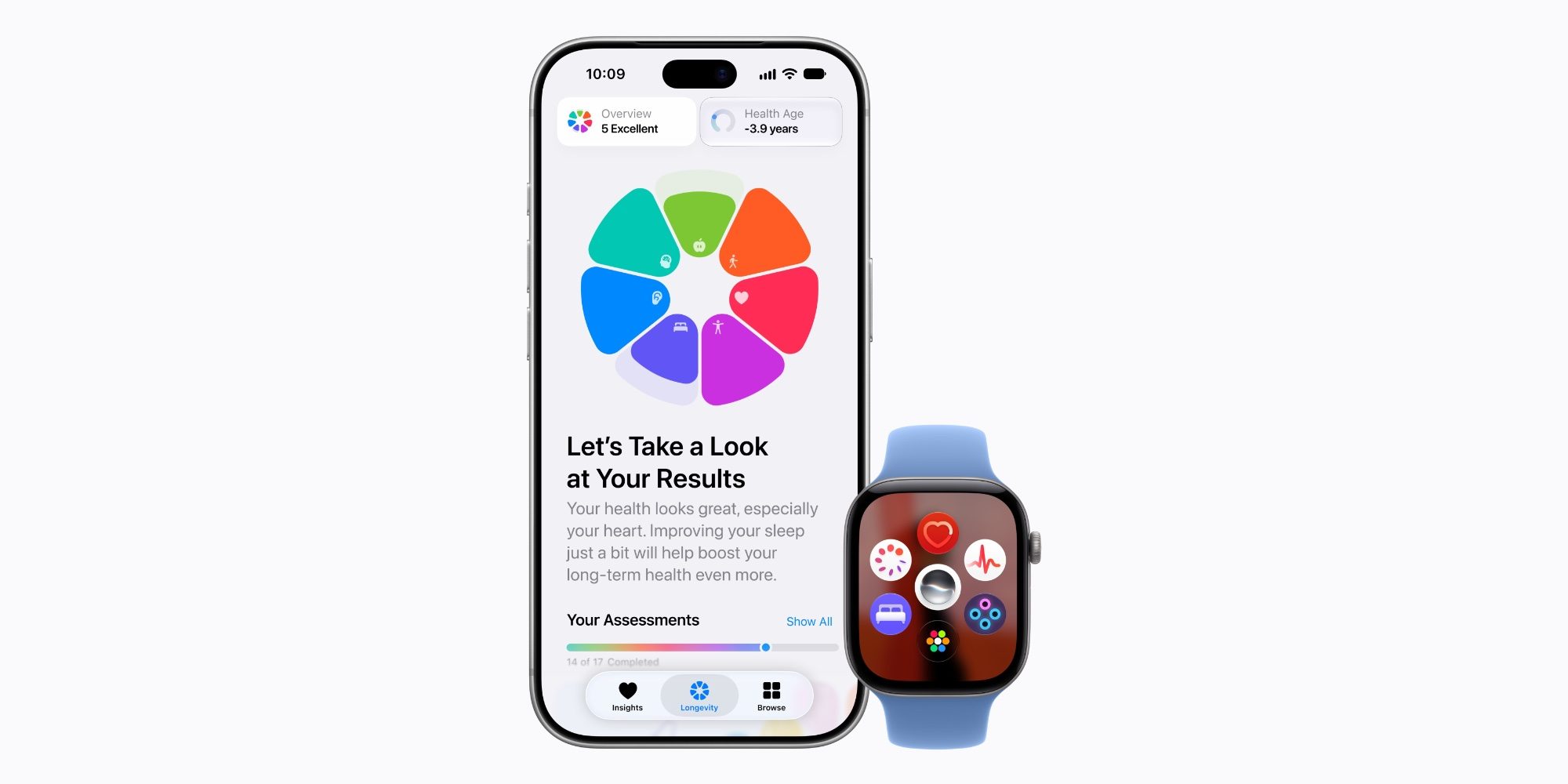
The redesigned Health app is back in iOS 27.3. This was first available during testing of iOS 27.2, but did not ship as part of this final update.
The redesigned Health app is divided into three tabs: Information, Longevity and Browse. The app features an all-new design that dynamically adapts based on your data, including Apple Intelligence. The Longevity tab includes a new Healthy Age feature that uses data from the Apple Watch to show how your measurements are tracking compared to your actual age.
For Apple Watch Series 12 and Apple Watch Ultra 4 users, it also provides easy access to view your readiness score each morning.
Apple Fitness+

For Apple Fitness+, iOS 27.3 adds a new Gym Strength feature. This creates progressive plans over four weeks based on your strength goals, experience, schedule and available equipment.
As you complete each week of training, the next week adapts based on the reps and weights you have recorded.
iPhone Duo Updates


For iPhone Duo users, iOS 27.3 adds accessibility support. This setting moves the interface on the outer screen to the right or left to make it easier to reach more distant corners. It’s designed to make iPhone Duo easier to use with one hand, despite the larger exterior screen. You activate it by swiping right on the right edge of the screen or left on the left edge.
Accessibility for iPhone Duo is enabled by default. You can turn it off in Settings > Accessibility > Touch > Accessibility.
iOS 27.3 also changes the iPhone Duo’s software keyboard, making the keys slightly narrower and the font slightly smaller.
Revamped monitoring
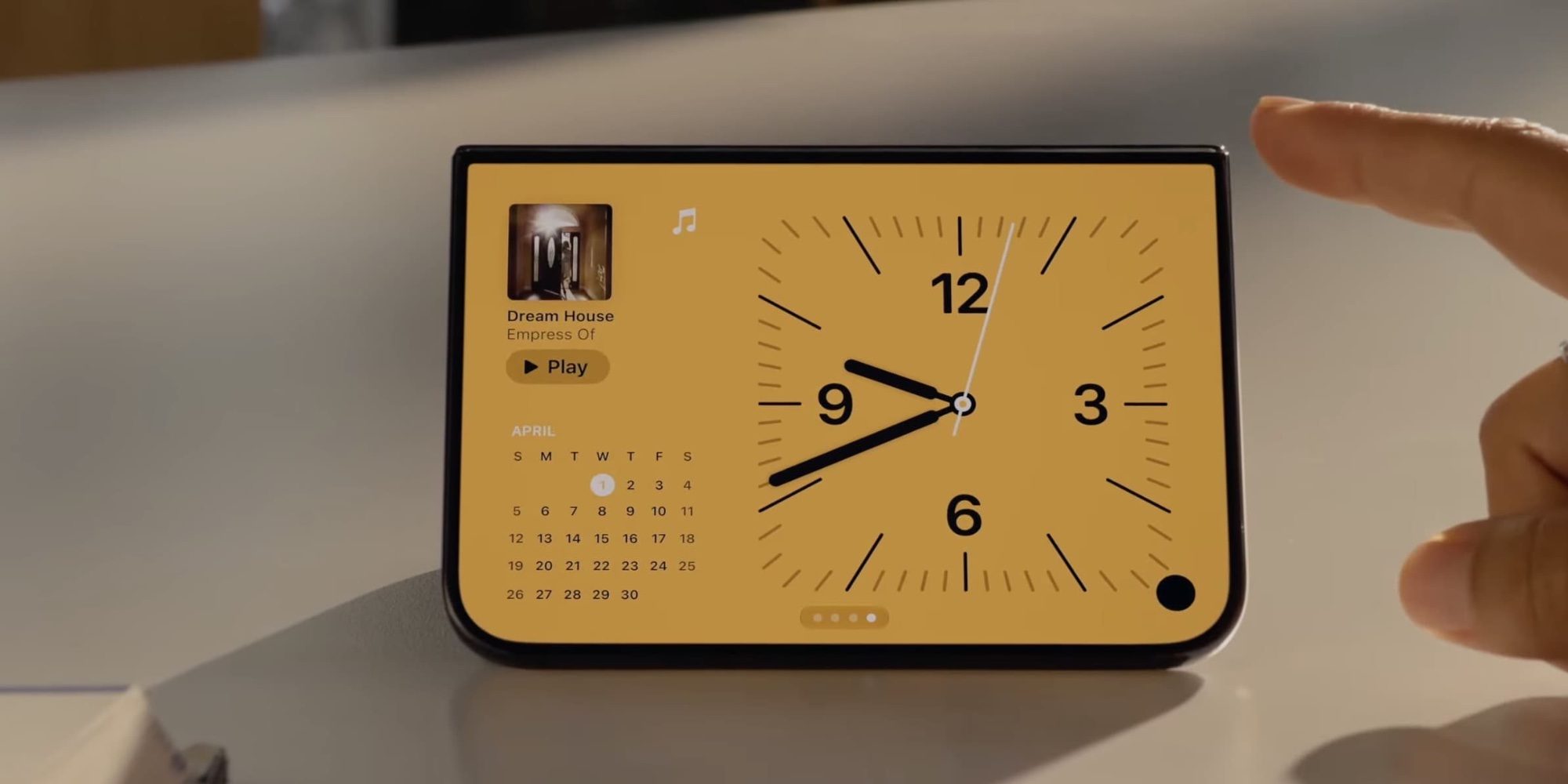
When it debuted, the iPhone Duo included a more robust version of StandBy with new clock faces and expanded customization options. iOS 27.3 brings the iPhone Duo StandBy experience to all iPhone models.
This includes redesigned analog and digital clock faces, as well as additional customization options for colors and complications. The update also adds support for shared albums to the Photos side.
Siri AI Updates
iOS 27.3 brings several key updates to Siri AI. First, the update expands Siri AI with many new features in Apple apps. Apple explains:
We’ve started rolling out these new features to many Apple apps, including Calendar, Files, Finder, Journal, Mail, Maps, Messages, Music, Notes, Photos, Overview, Reminders, Safari, Shortcuts, and Weather, so users can do things like find a coffee shop they visited last week or archive files that haven’t been opened in over a year.
Many more actions are now available as examples for your reference. To see what you can do in each app, just ask Siri AI.
With iOS 27.3, Apple also begins testing new ways for developers to create Siri AI integrations for the first time. This is described as a “developer first look.” Apple explains:
Today’s preview allows any app to import its content and actions directly into Siri AI using app intents, making it easier for all apps to leverage the latest Siri AI features, including personal context understanding, on-screen recognition, natural language, and more. So people can simply ask for help in their own words, and Siri AI performs any personalized action you’ve created, from checking out a delivery to booking to placing an order.
Although this is being tested as part of iOS 27.3, Apple says it will start shipping to customers in a few months.
iOS 27.3 also expands Siri AI to new languages, including French, Japanese, Korean, Portuguese, and Spanish.
Apple Intelligence in China
iOS 27.3 brings the original Apple Intelligence feature set to China for the first time. This does not include Siri AI or other iOS 27 updates, but does include the following features:
- Real-time translation in messages, FaceTime, phone and compatible AirPods
- Writing tools
- Visual intelligence
- To clean in the photos
- Genmoji
- Natural language search in the photos
- Memory Creation in Photos using any prompt
- Priority Mail in Apple Mail
- Email Summaries in Apple Mail
- Smart response in the Mail and Messages apps
- Notification summaries
- Priority notifications
- Reduce distractions new focus mode
- **Audio transcription summary **in the Notes app
- Call Transcript Summaries
- Siri improvements including Type to Siri, more natural language support, and the ability to maintain context during a conversation
New Safari Features

iOS 27.3 is a major update to Safari. First, the update adds support for a new vertical tab design layout on the iPhone Duo’s internal display. If you choose this option, your Safari tabs will be arranged vertically on the left side of Safari, rather than at the top. Vertical tabs are also available on Mac and iPad with macOS 27.3 and iPadOS 27.3.

iOS 27.3 also adds a new Adaptive Dark Mode feature. This feature can automatically apply dark mode to websites that don’t natively support it. You can choose to automatically enable adaptive dark mode or use it on a site-by-site basis.
Apple Music

For Apple Music users, iOS 27.3 adds a new “Selfie Sing” feature that allows users to record a video of themselves while singing karaoke. To use this feature, start playing a song and go to the lyrics view. Then tap the new camera button that appears to the right of the lyrics.
The update also refines the design of how lyrics are displayed when your iPhone is in landscape mode.
Learn more:- iOS 27.3 upgrades Apple Music in two ways, here’s what’s new
More information
Here are some other changes in iOS 27.3:
- You can now switch between VPNs directly from the Control Center, rather than just enabling or disabling the last one you used.
- In the Settings app, there is a new “Use global privacy control” toggle, but the support document for it isn’t live yet.
- In Freeform there are new tools for generating custom shapes and images.
Conclude
What are your favorite new features in iOS 27.3? Have you spotted any other changes in the update? Let us know in the comments.


FTC: We use automatic, revenue-generating affiliate links. More.
Gn tech