Just like the standard Surface Laptop, the Ultra variant doesn’t have any of the features of Microsoft’s convertible Surfaces. It looks like a sleek, all-metal business laptop. Open it up and you’ll notice that its 15-inch display has a tall 3:2 aspect ratio instead of the typical widescreen setup. And if you look at the bottom of the case, you’ll see a slightly segmented base (reminiscent of the Surface Laptop Studio), which leaves a little room for the vents and downward-facing speakers.
While there’s much to admire about Microsoft’s design prowess, the Surface Laptop Ultra’s biggest selling point is NVIDIA’s RTX Spark chip. It is an Arm-based system-on-a-chip that can be equipped with up to 20 CPU cores and 6,144 GPU cores. Heads up: You’ll have to shell out $3,700 to get the most powerful RTX Spark hardware here, but at least it comes with 32GB of RAM. The base $2,600 Surface Laptop Ultra has 18 CPU cores and 5,120 GPU cores.
Taking inspiration from Apple Silicon and Qualcomm’s recent Snapdragon X chips, the RTX Spark also features unified memory, accessible to both the CPU and GPU. This gives it even more memory bandwidth than a typical Intel or AMD-based Windows PC, whose dedicated RAM, CPU, and GPUs are spread across their motherboards. By having direct access to tons of RAM, RTX Spark hardware can also host large AI models locally, which is one of the main reasons Microsoft and NVIDIA are touting it as a major evolution for PCs.
Thanks to its NVIDIA GPU cores, the RTX Spark chip also delivers gaming performance similar to that of an RTX 5070 laptop GPU. This makes it ideal for 1440p gaming, and you can probably also get decent performance in 4K and other higher resolutions thanks to NVIDIA’s DLSS upscaling and frame generation. The Surface Laptop Ultra starts at a much higher price than most RTX 5070 gaming laptops, so it’s not something you’d want to buy for pure gaming.
The RTX Spark’s Arm processor is both a blessing and a curse: it can technically run more efficiently than x86-64 chips from Intel and AMD, but it also requires emulation of older Windows software and drivers. This opens the door to bugs and unforeseen issues, especially for niche apps and poorly supported third-party drivers. While this was a major issue when Microsoft first started trying Windows on Arm (remember the original Surface with Windows RT or the Surface Pro X), the company’s emulation for x86-64 software has improved significantly. Kernel-level anti-cheat software for multiplayer games did not initially work on early Windows Snapdragon X systems, but Microsoft and NVIDIA worked to resolve this issue. Now you can easily play Fortnite Arm-based Windows systems.
Microsoft initially touted the Surface Laptop Ultra’s 15-inch display as the brightest laptop display on the market, thanks to its eye-popping 2,000 nits of HDR brightness. Apple’s new MacBook Pro with PROLED display stole the show a bit, however: its screen can reach the same brightness, and its OLED display offers deeper blacks and higher contrast. The Surface Laptop Ultra’s mini-LED display is still very impressive, though, especially when watching HDR movies with rich colors or playing games that really push its brightness and HDR capabilities.
The Surface Laptop Ultra also has a keyboard similar to that of the Surface Laptop, which has always been a pleasure to type on thanks to its key depth and satisfying feedback. Its large trackpad also supports new haptic feedback in Windows. For example, you may feel a slight nudge when you move apps along the edges of the screen to lock them in place. We’ve seen similar haptic feedback on mice like Logitech’s MX Master 4, and while it’s not exactly revolutionary, I think it’s a nifty addition to Windows’ aging interface.
 Devindra Hardawar for Engadget
Oddly enough, one of the coolest things about the Surface Laptop Ultra is its magnetic USB-C charging cable. It allows the laptop’s charging cable to snap into a USB-C port, and like Apple’s MagSafe cable, it also allows the cable to slide out easily if someone trips on it. This is a useful replacement for the proprietary Surface Charging Connection, as it allows Microsoft to keep a standard USB-C port on the Laptop Ultra for charging, which will also work seamlessly with all other USB-C charging cables. The USB-C magnetic charging cable is a Microsoft invention, but the company says it could offer it to partner laptops if they’re interested.
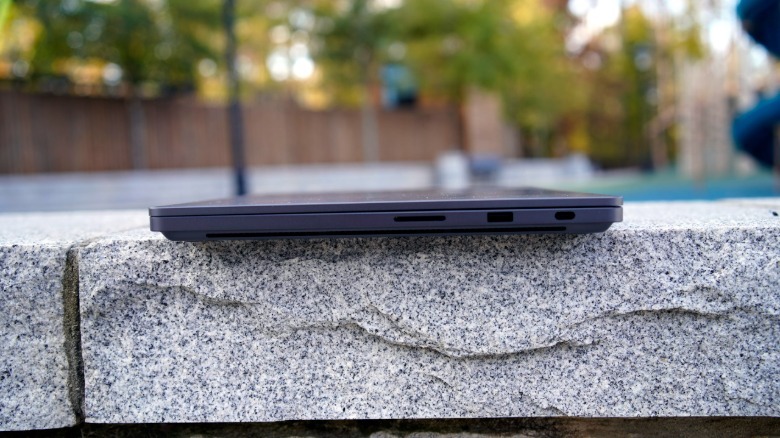
The Surface Laptop Pro’s ports mostly match those of the MacBook Pro, with three USB-C ports, HDMI, an SD card slot, and a headphone jack. But importantly, there is also a USB Type-A connection for older devices. I’ve found this to be very useful for some Windows creations.
Gn tech